Best Crypto Hardware Wallets for 2026 —3 Top Picks to Secure Your Coins

What is the best crypto hardware wallets in 2026?Ledger Nano X Plus, Trezor Model T, and NGRAVE ZERO are the best crypto hardware wallets for 2026, offering offline private-key storage and long-term protection for serious crypto holders.
If you plan to hold crypto beyond short-term trading, security eventually becomes more important than convenience. Hardware wallets — often called cold storage wallets — are designed for exactly that purpose: keeping your private keys offline, away from hackers, phishing attacks, and exchange failures.
This guide explains the best crypto hardware wallets for 2026, how they work, and how beginners can choose the right one without costly mistakes.
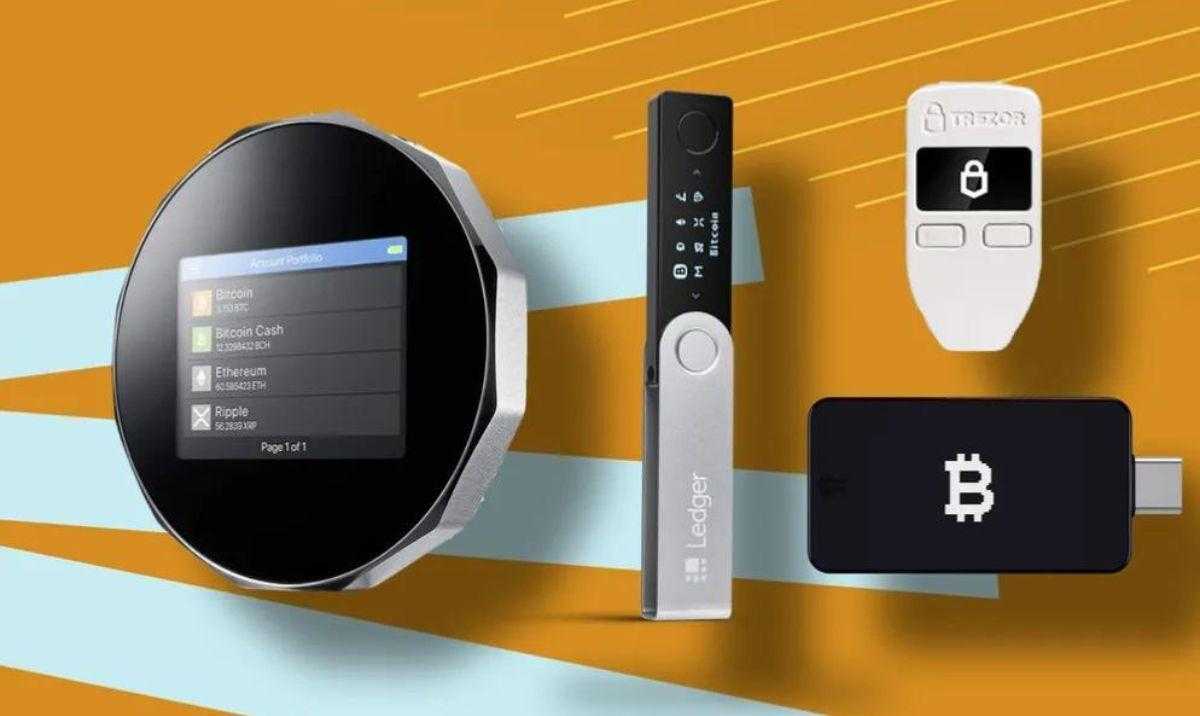
Table of Contents
- What Is a Crypto Hardware Wallet?
- Why Hardware Wallets Matter More in 2026?
- Best Crypto Hardware Wallets for 2026 (Top Picks)
- Hardware Wallet Comparison
- Conclusion: A Smarter Way to Hold Crypto
- References
- How to Trade Crypto on BTCC?
- BTCC FAQs
What Is a Crypto Hardware Wallet?
A crypto hardware wallet is a real gadget that keeps your private keys safe when you’re not online. The keys never leave the device, even when you sign transactions, unlike exchange accounts or software wallets. This design makes it much less likely that hackers and malware will be able to get into your computer from afar.
People often utilize hardware wallets to store Bitcoin, Ethereum, stablecoins, and altcoins they plan to hold for a long time. They don’t take the place of exchanges; they work with them. Most experienced users trade on exchanges and then move their assets to cold storage after the trades are done.
/ You can claim a welcome reward of up to 30,000 USDT🎁\
Why Hardware Wallets Matter More in 2026?
As more people use cryptocurrencies, assaults get more advanced. Most crypto losses in the last several years have occurred from private keys being stolen, not from problems with the blockchain. Hardware wallets fix this problem by keeping keys separate from the internet.
Regulation is another thing to think about. Exchanges are becoming more compliant and open, which is a good thing. However, this also means that long-term holders typically desire to keep their assets separate from their trading activities. Users have clearer control, fewer points of failure, and peace of mind when the market is volatile when they keep their assets in cold storage.
A lot of experienced traders learn this lesson the hard way. There are hardware wallets so that newbies don’t have to.
Best Crypto Hardware Wallets for 2026 (Top Picks)
Based on security architecture, ease of use, and real-world use, these are the most trusted hardware wallets moving into 2026.
1.Ledger Nano X Plus — Best Overall Choice
Ledger Nano X Plus strikes a good mix between security and ease of use. It has a Secure Element chip like the ones in bank cards and passports, which keeps private keys safe at the hardware level. The wallet works with Ledger Live to help you keep track of your portfolio, stake your coins, and manage your NFTs. It supports more than 5,500 cryptocurrencies.
Bluetooth support makes it easy for people who use mobile devices, but it still keeps private keys offline. Ledger gives most users, especially those with more than one asset, the freedom they need without putting their security at risk.
Before sending a lot of money, experienced users normally test little transactions first to get used to how the system works.
2.Trezor Model T — Best for Transparency & Open Source
People really like the Trezor Model T because its software is completely open source, which lets the community check and evaluate its security model. This openness is appealing to users who care about privacy and want to know exactly how their wallet works.
The touchscreen interface makes it easy to set up and approve transactions, so it’s easy for beginners to use even if it has complex security protections. It supports fewer assets than Ledger, but it does support important ones like Bitcoin, Ethereum, and major ERC-20 tokens.
Trezor is great for people who want to keep their Bitcoin safe for a long time and be able to check it at any time.
3.NGRAVE ZERO — Maximum Offline Security
NGRAVE ZERO is made for people who wish to be as isolated as possible. It works completely without any connections, such USB, Bluetooth, or Wi-Fi. Private keys are made and stored totally offline, so they never touch a device that is connected to the internet.
This more secure strategy costs more and takes longer to master, but it is appealing to people with huge portfolios or security concerns at the institutional level. It might be too much for regular consumers, but NGRAVE is the best for cold storage.
/ You can claim a welcome reward of up to 30,000 USDT🎁\
Hardware Wallet Comparison
| Wallet | Security Level | Ease of Use | Best For |
|---|---|---|---|
| Ledger Nano X Plus | High | Very Easy | Multi-asset holders |
| Trezor Model T | High | Easy | Open-source advocates |
| NGRAVE ZERO | Very High | Moderate | Maximum security seekers |
Can the IRS See Your Crypto Wallet?
The IRS can’t go straight to your hardware wallet or private keys. But transactions on the blockchain are open to the public. When an exchange links a wallet address to your identification, it becomes possible to trace your transaction history.
You still have to pay taxes if you use a hardware wallet. Depending on where you live, selling, trading, or earning crypto may still be taxable. The main benefit of cold storage is safety, not privacy.
When you move money between exchanges and hardware wallets, it’s far easier to declare your taxes later if you keep orderly records of all your transactions from the start.
Is Ledger or Trezor Better?
There is no one best option; whether one is best for you depends on how you use crypto.
Ledger is great at supporting assets, letting you access them on your phone, and having features that work with other apps. Trezor puts a lot of value on openness, security that is open source, and ease of use. People who hang on to their assets for a long time tend to prefer Trezor, whereas people who use several assets often choose Ledger.
The most important thing is to be consistent: pick one, learn it thoroughly, and always use your recovery phrase the right way.
Which Is the Most Trusted Crypto Wallet?
Design, not branding, is what makes people trust crypto. Most people think that hardware wallets that keep private keys offline and allow users complete control are the safest choice.
Millions of people throughout the world have used Ledger and Trezor for years, so they are battle-tested. They are still industry standards because they last a long time, do ongoing security research, and have clear documentation.
What Is the Best Crypto Cold Storage Wallet 2025–2026?
For most users entering 2026, Ledger Nano X Plus offers the best overall balance. Trezor Model T is excellent for transparency-focused holders, while NGRAVE ZERO suits those who want extreme isolation.
The “best” wallet is the one you understand, back up correctly, and actually use.
How to Use a Hardware Wallet Safely
1. Only buy from official makers
2. Set up the wallet without being online
3. Write down your recovery sentence on a piece of paper.
4. Don’t ever save the phrase on your computer
5. Start with a simple transaction to see if it works.
A common and safe way for novices to learn is to buy crypto on a regulated trading platform and then move it to cold storage when they are comfortable with how transactions work. This method lowers the number of blunders and boosts confidence before full self-custody.
Look More
How to Sell Crypto from a Cold Wallet — Beginner’s Guide
Best Anonymous Bitcoin Wallets (No KYC) in 2025 — A Beginner’s Guide to Staying Private
Conclusion: A Smarter Way to Hold Crypto
It’s not about being excessive when you take care of yourself; it’s about being intentional. Most people who stay on to crypto for a long time end up with a simple structure: they trade on a platform that follows the rules, keep their assets in cold wallets, and only move money when they need to.
Once that system is in place, security stops being stressful. It becomes a habit, and that’s when owning crypto really starts to feel powerful.
Best Crypto Hardware Wallets for 2026:FAQs
1.Can the IRS see your crypto wallet?
No direct access, but blockchain transactions can be traced if linked to your identity.
2.Is Ledger or Trezor better?
Ledger offers more assets and mobile use; Trezor emphasizes open-source transparency.
3.Which is the most trusted crypto wallet?
Hardware wallets like Ledger and Trezor are widely trusted for offline key storage.
4.What is the best crypto cold storage wallet 2025?
Ledger Nano X Plus, Trezor Model T, and NGRAVE ZERO are top choices.
References
Disclaimer
For more detailed market analysis, strategies, and educational resources, visit BTCC Academy and stay ahead of the curve in the rapidly evolving crypto space.
How to Trade Crypto on BTCC?
This brief instruction will assist you in registering for and trading on the BTCC exchange.
Step 1: Register an account
The first step is to hit the “Sign Up” button on the BTCC website or app. Your email address and a strong password are all you need. After completing that, look for a verification email in your inbox. To activate your account, click the link in the email.

Step 2: Finish the KYC
The Know Your Customer (KYC) procedure is the next step after your account is operational. The main goal of this stage is to maintain compliance and security. You must upload identification, such as a passport or driver’s license. You’ll receive a confirmation email as soon as your documents are validated, so don’t worry—it’s a quick process.

Step 3. Deposit Funds
After that, adding money to your account is simple. BTCC provides a range of payment options, such as credit cards and bank transfers. To get your money into your trading account, simply choose what works best for you, enter the amount, and then follow the instructions.
- Fiat Deposit. Buy USDT using Visa/Mastercard (KYC required).
- Crypto Deposit. Transfer crypto from another platform or wallet.
Step 4. Start Trading
If you wish to follow profitable traders, you might go for copy trading, futures, or spot trading. After choosing your order type and the cryptocurrency you wish to trade, press the buy or sell button. Managing your portfolio and keeping track of your trades is made simple by the user-friendly interface.

Look more for details: How to Trade Crypto Futures Contracts on BTCC
BTCC FAQs
Is BTCC safe?
Based on its track record since 2011, BTCC has established itself as a secure cryptocurrency exchange. There have been no reports of fraudulent activity involving user accounts or the platform’s infrastructure. By enforcing mandatory know-your-customer (KYC) and anti-money laundering (AML) procedures, the cryptocurrency trading platform gives consumers greater security. For operations like withdrawals, it also provides extra security features like two-factor authentication (2FA).
Is KYC Necessary for BTCC?
Indeed. Before using BTCC goods, users must finish the Know Your Customer (KYC) process. A facial recognition scan and legitimate identification documents must be submitted for this process. Usually, it is finished in a few minutes. This procedure has the benefit of strengthening the security of the exchange and satisfying legal requirements.
Because their accounts will have a lower daily withdrawal limit, those who do not finish their KYC are unable to make deposits. It should be noted that those who present a legitimate ID without a facial recognition scan will likewise have restricted withdrawal options.
Is There a Mobile App for BTCC?
Indeed. For users of iOS and Android, BTCC has a mobile app. The exchange’s website offers the mobile app for download. Since both the web version and the mobile app have the same features and capabilities, they are comparable.
Will I Have to Pay BTCC Trading Fees?
Indeed. BTCC levies a fee for trade, just like a lot of other centralised exchanges. Each user’s VIP level, which is unlocked according to their available money, determines the different costs. The BTCC website provides information on the charge rates.
Can I Access BTCC From the U.S?
You can, indeed. According to its website, BTCC has obtained a crypto license from the US Financial Crimes Enforcement Network (FinCEN), which enables the cryptocurrency exchange to provide its services to investors who are headquartered in the US.
According to BTCC’s User Agreement document, its goods are not allowed to be used in nations and organisations that have been sanctioned by the United States or other nations where it has a licence.
Hot Topic:
- Best Free Crypto Sign-Up Bonuses in 2025: Ultimate Guide for Traders & Investors
- How to Get Free $10 Crypto No Deposit Bonus 2025
- 5 Best Free Bitcoin Cloud Mining Sites & Apps in 2025
- Nvidia (NVDA) Stock Price Forecast 2025–2028 | AI Infrastructure Growth Outlook for Investors
- Compare Gold Prices in India and USA | Gold Rate Today
BTCC Guide:
- How to Trade Crypto Futures Contracts on BTCC
- How to Buy and Deposit Crypto on BTCC?
- What is Crypto Futures Trading – Beginner’s Guide
- What is Leverage in Cryptocurrency? How Can I Trade at 100X Leverage?
Crypto Buying Guides:
- How To Buy Bitcoin (BTC)
- How To Buy Picoin
- How To Buy Ethereum (ETH)
- How To Buy Dogecoin (DOGE)
- How To Buy Pepe Coin (PEPE)
- How To Buy Ripple (XRP)
Crypto Prediction:
- Ethereum (ETH) Price Prediction 2025, 2026, 2030 — Will ETH Reach $10,000?
- Ethereum Price Prediction 2025, 2026, 2030: How High Can ETH Go in 2024?
- Bitcoin (BTC) Price Prediction 2025, 2026, 2030 — Is BTC a Good Investment?
- Ripple (XRP) Price Prediction 2025 ,2026, 2030 — Will XRP Reach $1 After SEC Lawsuit?
- Pi Coin Price Prediction 2025,2026,2030 — Is Pi Coin a Good Buy?
- Pepe (PEPE) Price Prediction 2025, 2026, 2030 – Will PEPE Reach $1
Please be aware that all investments involve risk, including the potential loss of part or all of your invested capital. Past performance is not indicative of future results. You should ensure that you fully understand the risks involved and consider seeking independent professional advice suited to your individual circumstances before making any decision.
For any inquiries or feedback regarding this article, please contact us at: [email protected]