How to Find Wallet Address on Binance? Guide For Beginners


A crypto wallet address is a one-of-a-kind alphanumeric code that lets you transfer and receive digital assets on certain blockchain networks. In 2026, understanding how to locate and verify these addresses is the most fundamental skill for any trader.
This article will show you how to find wallet address on binance step by step, whether you are getting money from a friend or shifting your money to a specialised trading platform.
What is Crypto Wallet Address?
Your Binance Wallet Address is like a digital mailing address. You need to give your Bitcoin address in order to get Bitcoin. You need your Ethereum address to get Ethereum.
Important Rule for 2026: Don’t transmit one type of cryptocurrency to an address for another type (for example, don’t send BTC to an ETH address). This will cause you to lose money for good.
How to Find Binance Wallet Address?
Finding your cryptocurrency wallet address on Binance is simple, but it can be confusing at the beginning. Therefore, we put this beginner’s guide together to help you find your Binance wallet address. In addition, we also provide you with some tips.
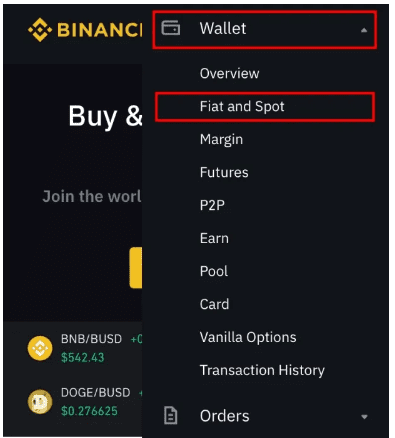
1: Log in to Binance and Navigate to “Fiat and Spot”
After logging in to Binance, select “Wallet” from the top menu button, and then select “Fiat and Spot (Deposits & Withdraw)” from the drop-down menu.
2: Search your Cryptocurrency
From your Fiat and Spot” wallet, use the search bar below your balance to search for the cryptocurrency you want to receive. The cryptocurrency you search for will appear under “Crypto Balances”. Then select “Deposit” on its right.
If you use the Binance mobile app, click on three dots and select “deposit”.

3: Select a Network
This is where most beginners (Dummies) make mistakes. Some coins exist on multiple blockchains.
For example, if you are getting USDT, you have to choose between ERC-20 (Ethereum), TRC-20 (TRON), or BEP-20 (BSC).
The network you choose on Binance MUST be the same as the one used by the person or platform sending the money.
4: Copy your Binance Wallet Address
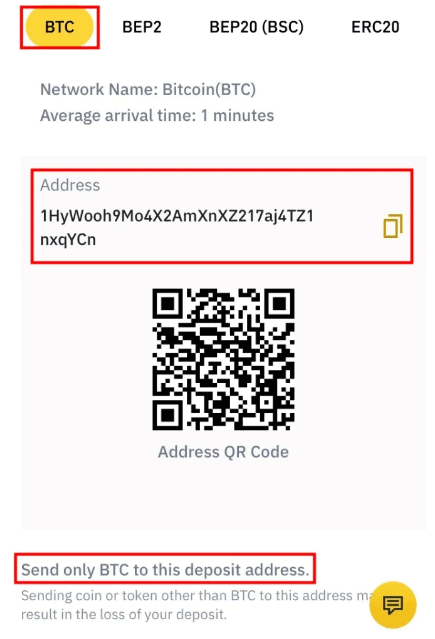
Once you have selected your network, you will see your Binance wallet address. This is the address for the specific cryptocurrency and network you selected. Click the “copy” icon on the right side of the address to copy the address.
Alternatively, you can use your mobile device to scan the QR code (including your address). As you can see, finding your Binance wallet address is very simple. The most important thing is not to worry and make sure you choose the right wallet for the token you want to send or receive. We recommend sending the cross test amount first, especially when the network cost is low.
We also recommend copying and pasting the cryptocurrency wallet address or using QR. Once you have pasted the address, please carefully check the first three letters and the last three letters to ensure that the address is complete and correct.
💡 Pro Tip: From “Learning” to “Earning”
Now that you’ve mastered the Binance Wallet Address process, the smartest way to test your skills is by moving a small amount of capital to a professional trading environment.
Many traders who start on Binance eventually migrate their active portfolio to BTCC. As the world’s longest-running exchange (est. 2011), BTCC offers a streamlined, “dummy-friendly” experience that removes the complexity of larger hubs.
- Financial Safety Net: New users can access a 2026 Welcome Reward package of up to 30,000 USDT to act as a buffer for their first trades.
- Historical Trust: With a 15-year clean security record, BTCC is the preferred “Safe Haven” for traders moving away from crowded custodial platforms.
Transferring a small test amount from Binance to your BTCC account is the best way to verify your address knowledge while unlocking professional trading rewards
Look More: How to Deposit and Withdraw Crypto on BTCC
Why Can’t I See My Binance Wallet Address?
If the “Deposit” button is greyed out or the address isn’t showing up, it’s probably because of one of these things:
KYC Status: Your Binance identity verification may not be complete or may have run out.
Network Maintenance: Your Binance identity verification may not be finished or may have expired.
Account Security: If you recently updated your password or two-factor authentication, Binance may temporarily limit your wallet’s features for 24 to 48 hours.
Conclusion
Getting your Binance wallet address is the first step into the larger world of cryptocurrency. You can migrate your assets to platforms that offer greater incentives, reduced costs, and better trading tools after you know how to deposit and withdraw.
Are you ready to use what you know? Take your first “test deposit” to a professional setting and start your trip with a safe edge.