How to Find Your SafePal Wallet Address: The Complete 2026 Guide

- Understanding SafePal's Multi-Chain Architecture
- Locating Your Address on SafePal Mobile App
- Verifying Addresses with SafePal Hardware Wallets
- Using the SafePal Browser Extension
- 2026 Security Best Practices
- Setting Up Your SafePal S1 Hardware Wallet
- Transferring Crypto to Your SafePal Wallet
- Binance Smart Chain (BSC) Integration
- Frequently Asked Questions
If you want to safely receive crypto transactions, then it is very important that you learn how to locate your SafePal wallet address. This step-by-step guide covers how to find your address on all SafePal platforms that include the mobile app, browser extension and hardware wallet like S1 Pro. Including important security practices, multi-chain aspects and how to get the best from hardware wallets in order for you not ever lose funds because of an address typo.
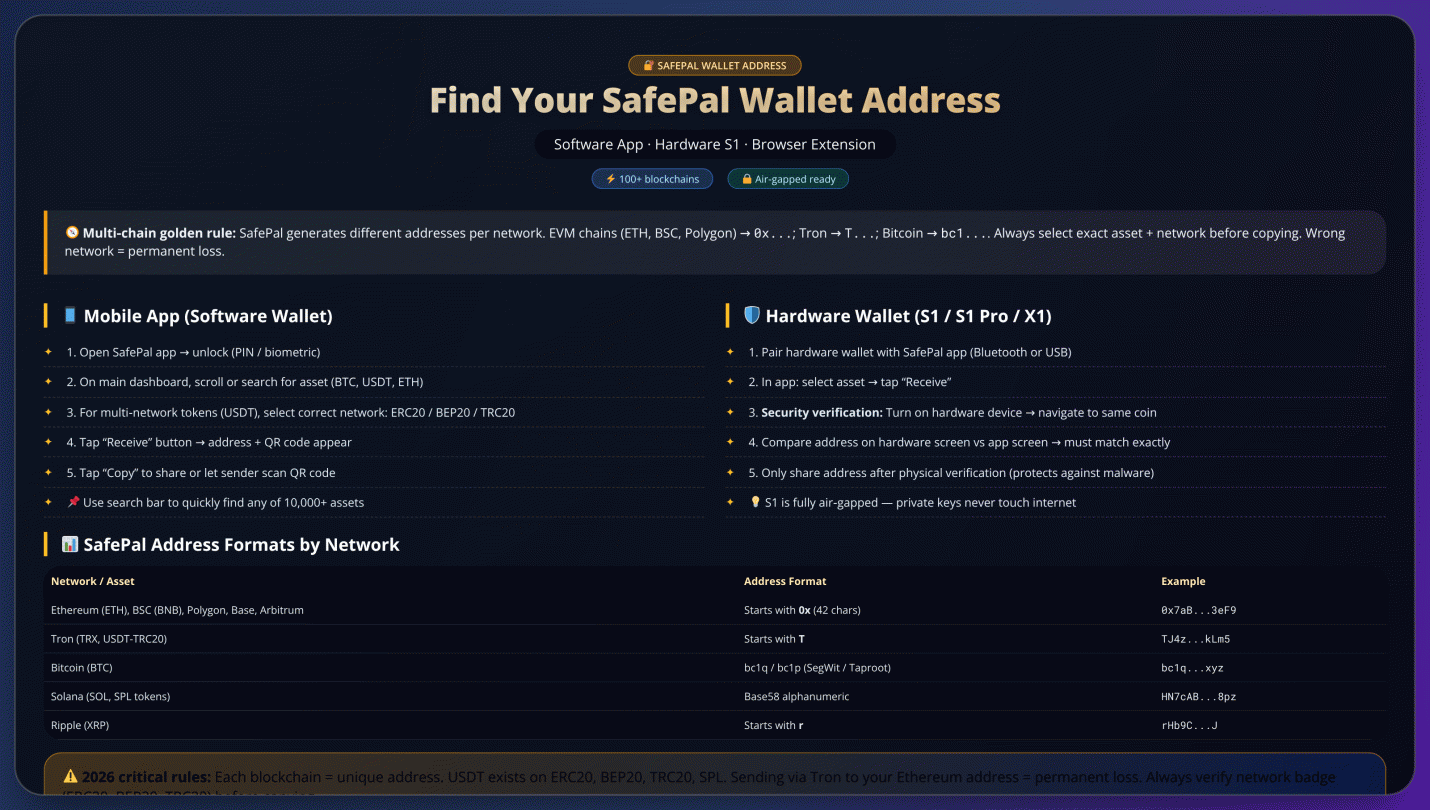
Understanding SafePal's Multi-Chain Architecture
As SafePal connects with above 100 blockchains, the format of addresses for each blockchain differs from one another. So, before your funds get transferred here are some of the things you should be aware about — EVM Networks (ETH, BSC, Polygon): 0x Platforms: Tron Network (TRC20) - wallets will be starting with T Bitcoin Network — Typically has bc1 (SegWit/Taproot) To avoid irreversible loss of your funds, always match the networks for sender and receiver.
Locating Your Address on SafePal Mobile App
SafePal also has a mobile app that allows you to manage both software and hardware wallet addresses in seconds. In a world where cryptocurrency transactions are quickly becoming the norm, it is essential to learn how to locate and verify your wallet address properly if you want to transfer funds safely. The steps vary a little bit whether you are using another software wallet or have paired a SafePal hardware device.
For software wallet users, follow these detailed steps to find your receiving address:
When validating addresses, hardware wallet users are at an added risk and need to be more cautious. Once you go through the same steps via mobile app, step 2 requires to cross-check what your physical SafePal device displays with respect on which address is shown. This two-step verification system will safeguard them from any potential malware that may redirect addresses from the phones of their victims.
The SafePal ecosystem supports over 100 blockchains, each with distinct address formats. Below is a quick reference table for common cryptocurrency address formats:
| Network | Address Format | Example |
|---|---|---|
| EVM Networks (ETH, BSC, Polygon) | Starts with 0x | 0x71C7656EC7ab88b098defB751B7401B5f6d8976F |
| Tron (TRC20) | Starts with T | TNPZqNpM8K7Q8K5hD3v7ZqNpM8K7Q8K5hD3 |
| Bitcoin | Starts with bc1, 1, or 3 | bc1qar0srrr7xfkvy5l643lydnw9re59gtzzwf5mdq |
Always confirm the first and last four characters of your address shown in wallet when given to others. Before sending large amounts we recommend that you do a small test transaction since cryptocurrency transactions are irreversible. SafePal wallet addresses are both case-sensitive and network-specific (that is, if you send BEP20 tokens to an ERC20 address then your funds will be lost forever).
Verifying Addresses with SafePal Hardware Wallets
For SafePal hardware wallet users, the address verification process involves critical security checks that protect against digital threats. This guide details the proper procedure for confirming your wallet addresses when using SafePal's S1, S1 Pro, or X1 devices.
Essential Verification Protocol
1. Begin by establishing a secure connection between your hardware wallet and the SafePal mobile application. This creates an encrypted channel for address generation.
2. Initiate address generation through the mobile interface: - Select your target cryptocurrency from the asset list - Confirm the appropriate network protocol - Request a new receiving address
3. The verification phase requires comparing three key elements: - The complete alphanumeric string - Network identification markers - Cryptocurrency symbols These must match exactly between your mobile display and hardware wallet screen.
Security Rationale
This dual-display verification provides protection against: - Malware that alters displayed addresses - Phishing attempts - Man-in-the-middle attacks The hardware wallet's offline nature ensures its display remains uncompromised by internet-based threats.
Security experts recommend: - Verifying addresses under proper lighting - Checking both starting and ending segments - Confirming each new address individually - Comparing network designations carefully
Enhanced Protection Measures
Complement your address verification with these practices: - Maintain physical control of your hardware device - Store recovery phrases offline in secure locations - Utilize all available authentication methods - Regularly update wallet firmware - Verify transaction details on the hardware screen
Following these protocols ensures maximum security when conducting cryptocurrency transactions with your SafePal hardware wallet.
Using the SafePal Browser Extension
For cryptocurrency users who prefer desktop access, the SafePal browser extension provides a convenient way to manage wallet addresses. The process is straightforward but requires attention to detail to ensure security. Here's how to find and use your wallet address through the extension:
Step 1: Find the SafePal icon in the browser toolbar (usually at top-right corner on Chrome, Firefox and Edge). With this icon you can open the interface of the extension. You will be prompted to enter your password in order to unlock the wallet (notice that this security step prevents other people from accessing our funds).
After unlock, go to the page "Receive" with a down arrow icon. This section shows the different cryptocurrencies available in your wallet. Search for specific assets like bitcoin (BTC), ethereum (ETH) or one of the many stablecoin options. Even better, the interface makes it perfectly clear from which network each token starts thanks to badges (ERC-20, BEP-20, TRC-20 etc.), this is very important for making sure that you choose indeed the correct version of your asset.
When you've selected the appropriate cryptocurrency and verified its network, the extension will display both the alphanumeric wallet address and a corresponding QR code. For maximum security, we recommend:
- Double-checking the first and last four characters of any copied address
- Verifying the network badge matches the sender's requirements
- Using the QR code when possible to prevent typing errors
The browser extension synchronizes with both software and hardware wallet options, maintaining SafePal's security standards across platforms. For hardware wallet users, remember to physically verify the address on your device screen before sharing it, as this provides protection against potential malware that might alter clipboard contents.
2026 Security Best Practices
In the rapidly evolving world of cryptocurrency, maintaining robust security practices is essential to protect your digital assets. As we move through 2026, the sophistication of cyber threats continues to grow, making it crucial to adopt advanced precautions when handling your SafePal wallet address and transactions. Here are the key security measures every crypto user should implement:
Address Handling Protocols
Wallet addresses are complex cryptographic strings where even a single character error can result in permanent loss of funds. Always use the copy/paste function rather than manually typing addresses. Modern malware has become increasingly sophisticated, with clipboard hijackers that can secretly replace your copied address with a hacker's address. To counter this, develop the habit of verifying the first four and last four characters of any pasted address against what's displayed in your SafePal wallet.
Transaction Verification
For significant transfers, implement a two-step verification process: First send a small test transaction (we recommend $2-5 worth of cryptocurrency) to confirm the address is correct. Only after verifying the test transaction's successful arrival should you proceed with the full amount. This simple practice could save you from catastrophic losses.
Recovery Phrase Security
Your 12 or 24-word recovery phrase is the master key to your cryptocurrency holdings. Store it physically (never digitally) in multiple secure locations. Consider using fireproof and waterproof storage solutions. Never share your recovery phrase with anyone, and be wary of phishing attempts that may try to trick you into revealing it.
Device and Network Security
Always ensure your SafePal app and hardware wallet firmware are updated to the latest version. Use secure networks when accessing your wallet, avoiding public WiFi for sensitive operations. For hardware wallet users, physically verify all receiving addresses on your device's screen before transacting.
By implementing these 2026 security best practices, you significantly reduce your vulnerability to both technical exploits and human error. Remember that in cryptocurrency, security isn't just about protecting against external threats - it's about building habits that prevent your own potential mistakes from becoming costly errors.
Setting Up Your SafePal S1 Hardware Wallet
Setting up your SafePal S1 hardware wallet is a straightforward process designed to provide maximum security for your cryptocurrency holdings. As the BTCC team recommends, hardware wallets like the SafePal S1 offer superior protection compared to software wallets since they keep your private keys offline. Here's a detailed 2026 guide to getting started with your new device.
First, connect your SafePal S1 to your computer using the included USB cable. The device will prompt you to set a secure PIN - avoid using simple combinations like "1234" as these are easily compromised. Choose a memorable but complex PIN that only you would know. This PIN serves as your first line of defense against unauthorized access.
Next, download the official SafePal app from either the Apple App Store or Google Play Store. The mobile application serves as the interface for managing your hardware wallet. When launching the app for the first time, select "Hardware Wallet" from the home screen to begin the setup process. The app will guide you through creating a new wallet with a strong password (minimum 8 characters) that adds another layer of security.
The most critical step comes next: generating and securing your 12-word recovery phrase. This phrase represents the master key to your cryptocurrency holdings. Write it down exactly as shown on the SafePal S1 screen using the provided recovery card. Store this card in multiple secure locations - never digitize it or store it online where it could be stolen. The BTCC team emphasizes that losing this phrase means permanently losing access to your funds if your hardware wallet is damaged or lost.
After recording your recovery phrase, you'll need to verify it by entering the words back into the app when prompted. This verification step ensures you've correctly recorded the phrase. Once verified, your wallet setup is complete and ready to use for sending, receiving, and managing your digital assets.
For optimal security, always keep your SafePal S1 firmware updated. You can check for updates through the app's Settings menu under "Firmware Update." These updates often include important security patches and new features. The update process preserves your wallet information and doesn't affect your recovery phrase.
Remember that while hardware wallets like the SafePal S1 provide excellent security, they're only as safe as your practices. Never share your PIN or recovery phrase, and always verify receiving addresses on your hardware device's screen before transacting. For additional security considerations when managing cryptocurrency, consult resources from CoinMarketCap or TradingView for market data and security best practices.
Transferring Crypto to Your SafePal Wallet
Transferring cryptocurrency to your SafePal hardware wallet is a straightforward process that ensures your digital assets remain secure. Here's a detailed step-by-step guide to help you through the procedure:
Initializing Your SafePal S1 Device
When you first receive your SafePal S1 hardware wallet, you'll need to initialize it. Connect the device to your computer using the included USB cable and enter the default PIN code '1234' to begin the setup process. You'll then be prompted to create a new, secure PIN. Choose a combination that's easy for you to remember but difficult for others to guess, as this PIN will be required every time you access your wallet.
Connecting and Unlocking Your Wallet
After initialization, connect your SafePal S1 to your computer via USB whenever you want to make transactions. Enter your personalized PIN to unlock the device. The wallet will appear as a USB drive on your computer, allowing for secure interaction with your cryptocurrency holdings.
Locating Your Receiving Address
To receive funds, you'll need to find your wallet's public address. Open the SafePal mobile app and navigate to the asset you wish to receive. Each cryptocurrency has its own unique address format, so ensure you're viewing the correct one for the asset you're expecting. The app will display both the alphanumeric address and a QR code for convenient sharing.
Verifying Addresses for Security
For maximum security, always verify the receiving address on your hardware wallet's screen before sharing it. This crucial step protects against potential malware that might alter addresses displayed on your computer or phone. Compare the address shown on your SafePal S1 device with the one displayed in the app - they should match exactly.
Sharing Your Address
Once verified, you can safely share your receiving address with the sender. You can either copy the alphanumeric string or provide the QR code for scanning. Remember that each cryptocurrency has its own address format, so double-check you're sharing the correct one for the asset being transferred.
Special Considerations for BSC Transactions
When dealing with Binance Smart Chain (BSC) transactions, pay special attention to address formats. BSC uses BEP20 addresses, which are distinct from other blockchain address formats. Always confirm you're using the BEP20 version of your address when receiving BSC-based tokens to avoid potential loss of funds.
By following these steps carefully, you can securely transfer your cryptocurrency assets to your SafePal hardware wallet, keeping them protected from online threats while maintaining full control over your digital wealth.
Binance Smart Chain (BSC) Integration
SafePal's 2026 integration with Binance Smart Chain (BSC) revolutionizes decentralized finance (DeFi) operations through its advanced technical architecture. The platform's EVM-compatible environment facilitates direct interaction with over 500 dApps, featuring enhanced cross-chain interoperability protocols that support asset transfers across 15+ blockchain networks. Transaction processing achieves unprecedented efficiency with BSC's optimized consensus mechanism delivering sub-3-second block confirmations.
The wallet's integrated development environment includes:
- Smart contract debugging tools with real-time gas estimation
- Multi-signature approval workflows for institutional users
- Automated slippage protection for DEX transactions
- In-wallet token analytics with price impact calculations
Key technical specifications for BSC operations:
| Parameter | Value |
|---|---|
| Gas Token | BNB (BEP20 only) |
| Average TX Cost | $0.05-$0.15 |
| Throughput | 300+ TPS |
| Finality | 1 block (3 sec) |
The platform introduces novel security features including:
For developers, SafePal offers SDKs supporting 11 programming languages and comprehensive API documentation for building custom DeFi solutions. The wallet's node infrastructure provides direct access to BSC's full historical data through optimized RPC endpoints, enabling sophisticated portfolio analysis tools within the application interface.
Frequently Asked Questions
How do I find my SafePal wallet address?
Open the SafePal app, select your cryptocurrency, tap "Receive," and copy the displayed address. For hardware wallets, verify the address on your physical device screen.
Can I use the same address for different networks?
No. EVM networks (ETH, BSC) share address formats, but other chains like bitcoin or Tron require different addresses. Always confirm the network matches.
Is it safe to copy my SafePal address?
Generally yes, but always verify against your hardware wallet display if using one. Watch for malware that might alter clipboard contents.
What if I send crypto to the wrong network?
Funds sent to incompatible networks are typically lost permanently. Double-check network compatibility before every transaction.
How do I update my SafePal S1 firmware?
In the SafePal app, go to Settings > Firmware Update with your device connected. Updates maintain security without affecting your wallet data.
References:https://www.binance.com/en/square/post/919170952489
https://www.safepal.com/en/blog/binance-smart-chain-x-safepal

Log in to Reply
Log in to comment your thoughtsComments
Related Articles
|Square
Get the BTCC app to start your crypto journey
Get started today Scan to join our 100M+ users