About BTCC
- 1How to Trade Crypto Futures Contracts on BTCC
- 2How to Use BTCC Bonus to Trade: A Beginner’s Guide to Risk-Free Crypto Trading
- 3How to Deposit and Withdraw Crypto on BTCC
- 4About BTCC Fees – A Beginner’s Guide (2026 Updated)
- 5How to Buy USDT on BTCC — Beginner’s Step-by-Step Guide
- 6How Does BTCC Work?
- 7About BTCC 0-Fee Campaign: A Complete Guide to Eliminating Crypto & TradFi Trading Costs
- 8How to Trade Crypto with BTCC on TradingView
- 9How to Withdraw Crypto on BTCC
- 10BTCC Demo Trading Guide (2026): How to Practice Crypto Futures Trading Risk-Free
- 11BTCC Referral Code "1Z1OTN" for June 2026
- 12BTCC Review 2026: Best Crypto Futures Exchange
- 13How to Register an Account on BTCC
- 14How to Deposit Crypto on BTCC
- 15BTCC Crypto Leverage Trading Guide 2026
- 16BTCC Deposit Bonus & Campaign in 2026
- 17How to Login BTCC Account in 2026: Step-by-Step Guide for Beginners
- 18How to Trade on BTCC in the US: Step-by-Step Guide for Beginners
- 19Is BTCC Available in the USA? (July 2026 Updated Guide)
- 20BTCC App Review 2026: Is It Safe and Legit?
How to Withdraw Crypto on BTCC


The next important skill for any trader is to learn how to withdraw money after successfully using our Crypto Deposit Guide. If you want to move profits to a cold wallet or assets to another exchange like Binance or MAX, you need to know the technical steps to keep your money safe.
In the world of digital assets in 2026, accuracy is key. This guide shows you how to use the BTCC withdrawal system step by step.
How to Withdraw Crypto on BTCC
Step 1: Go to the Withdrawal Menu. In the upper right corner of the homepage, click on “Assets.” Then, from the dropdown menu, choose “Withdraw.”

Step 2: Choose a currency. Choose the coin you want to send from your BTCC account.

Step 3: Choose a Network. Pick the right blockchain network, and make sure it works with the wallet or platform you’re using to receive it. If they don’t match up, your transaction could fail, or even worse, you could lose your money for good.
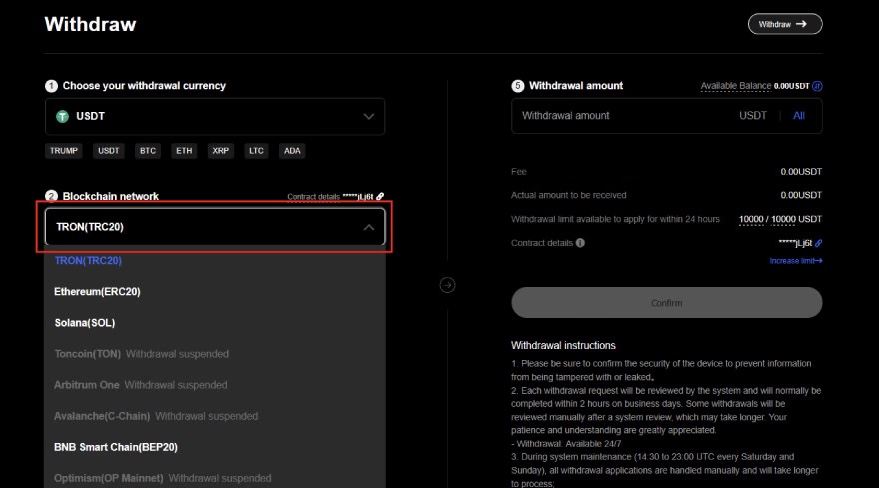
Step 4: Fill in the Withdrawal Address. Carefully paste the address of the person you want to send it to. If you make a minor error, you could send your crypto to the wrong destination.

Step 5: Choose the platform for withdrawal. Choose the platform you want to withdraw to. If your wallet or exchange isn’t displayed, choose “Other” and type in the information yourself.

Step 6: Enter the amount. Type in the amount you want to take out. Make sure it satisfies the minimal amount you can take out for that asset.
Step 7: Check and Confirm. Check everything again, such as the amount, fees, and limits on withdrawals. Click [Confirm] to go ahead with the transaction if everything appears good. Your money will be on its way after this.
/ You can claim a welcome reward of up to 30,000 USDT🎁\
Transferring to Major Exchanges: Quick Reference
1. BTCC to Binance
To move funds to Binance, first open the Binance App > Funds > Spot > Deposit to copy your address.
-
On BTCC: Make sure the network is exactly the same (for example, if you choose USDT-TRC20 on Binance, you must choose USDT-TRC20 on BTCC).
2. BTCC to Local Exchanges (ACE / MAX)
For users in specific regions using ACE or MAX:
-
On ACE/MAX: Go to Wallet > Deposit > Receive to generate your address.
-
On BTCC: Paste the address, choose “Other” as the source, and write in the name of the exchange.
BTCC Deposit and Withdrawal Fee
BTCC has clear fees. It doesn’t cost anything to make a deposit, but it does cost money to take money out, depending on the type of blockchain network and how busy it is.
| Currency | Network | Withdrawal Fee | Min. Withdrawal |
| USDT | TRC20 | 2 USDT | 20 USDT |
| USDT | ERC20 | 20 USDT | 50 USDT |
| BTC | BTC | 0.0004 BTC | 0.0015 BTC |
| ETH | ERC20 | 0.005 ETH | 0.02 ETH |
| XRP | Ripple | 1 XRP | 50 XRP |
Pro-Tip for New Users: The “Small Test” Strategy
If this is your first time withdrawing, we suggest doing a “Test Transfer” with the smallest amount. You can move on with the rest of the balance after you see the money appear in your target wallet.
Conclusion: Why Start Your Journey on BTCC?
BTCC has worked for 15 years to design a user experience that puts safety and convenience of usage first. You can fully control your worldwide crypto portfolio by mastering these deposit and withdrawal movements.
If you haven’t put money in your account yet, you can still get the Welcome Rewards for new traders. Now is the best moment to look into the 2026 markets using a platform that has a history of being safe.